EN fortrader
28 March, 2026

Take Profit Orders: How to Set and Use Them in Forex Trading

ForTrader.org
RU EN
and proceed to Step 2.Step 2: Choose Your Take Profit MethodYou have three options:Set a specific number of pips from the current market priceSelect a suggested minimum take profit levelManually enter the exact price level for your target profitThe third option—manually entering the price—gives you the most control. This is recommended because setting pips from current price can result in a loss if your trade is already underwater. Always base your take profit on your entry price, not the current market price.Step 3: Enter Your Target PriceFor a sell order, if you entered at 1.13200 and want 20 pips profit, manually enter 1.13000 (20 pips below entry). This ensures your take profit is calculated from your actual entry point, not the current price.Step 4: Confirm and MonitorClick the modify button to apply your take profit. The system may offer to print a record of this action—useful if you keep a trading journal. Your take profit level will now appear on the price chart and in your trade details.How to Cancel a Take Profit OrderIf you need to remove or adjust your take profit:Hover your mouse over the take profit line on the chartRight-click and select

Take Profit (TP) is an automatic order that closes a trade at a predetermined price level to lock in profits. When the market price reaches your target, the position closes automatically—even if your trading terminal is offline, since the order is stored on your broker’s server.

Illustration: Take Profit Orders: How to Set and Use Them in Forex Trading

What Is Take Profit?

A take profit order allows you to secure gains without monitoring the market continuously. This is especially useful when you cannot watch your open positions or expect sharp price movements. Unlike manual exits, TP removes emotional decision-making and ensures you capture your target profit level.

How to Set Take Profit for Buy and Sell Orders

For buy orders (long positions): Place take profit above your entry price, since you expect the price to rise. For example, if you enter EUR/USD at 1.12595 and want a 50-pip profit, set take profit at 1.13095.

For sell orders (short positions): Place take profit below your entry price, since you expect the price to fall. If you enter a sell at 1.13200 and want a 50-pip profit, set take profit at 1.12700 (accounting for five-digit quotes where 50 pips = 0.0050).

Take profit can be applied to all order types, including pending orders. Like stop loss orders, it executes automatically on the broker’s server regardless of terminal status.

How to Set Take Profit in MetaTrader 4

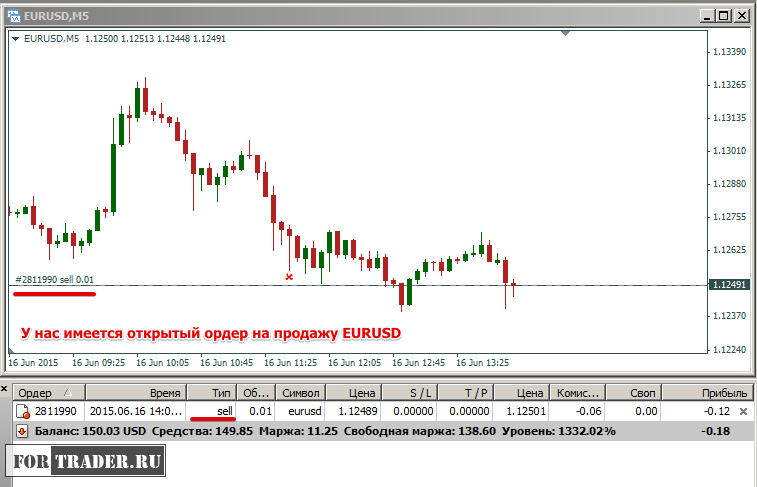
Step 1: Access the Order Modification Menu

Right-click on your open trade in the Terminal tab. Select
Delete Take Profit

ForTrader.org

ForTrader.org

Author

Subscribe to us on Facebook

Fortrader contentUrl Suite 11, Second Floor, Sound & Vision House, Francis Rachel Str. Victoria Victoria, Mahe, Seychelles +7 10 248 2640568

More from this category

All articles

Recent educational articles

All articles

The editor recommends

All articles
Loading...